مثال: یک tuple با سه عضو برای نگهداری نام کاربری مدیران ارشد شرکت ایجاد و سپس آن را چاپ کند (شکل124).
شکل ۱۲۴
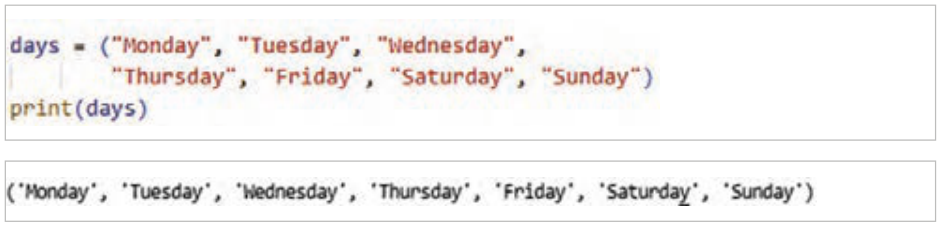
مثال: در برنامۀ شکل 125 از یک توپِل برای نگهداری نام روزهای هفته استفاده شده است، زیرا نام روزهای هفته تغییرپذیر نیستند، پس این نوع ساختار داده مناسب نگهداری این مقادیر میباشد.
شکل ۱۲۵
دسترسی به عناصر Tuple
مانند لیستها عناصر توپل هم دارای index هستند و دسترسی به عنصر با شمارۀ ایندکس آن انجام میشود.
مثال: در این برنامه ابتدا یک توپل به نام name_ port برای نگهداری نام درگاههای ورودی یک سیستم رایانهای ایجاد و سپس عنصر سوم آن نمایش داده شده است. دقت کنید ایندکس عناصر از صفر است (شکل126).
شکل ۱۲۶
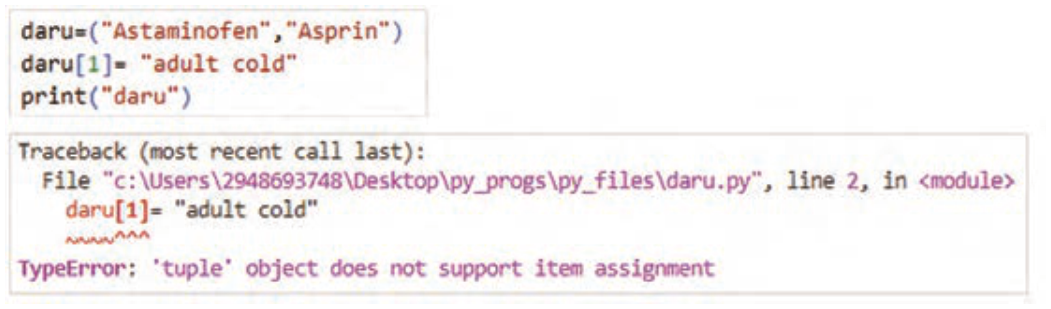
عناصر یک توپل تغییرناپذیر (immutable) هستند. یعنی اگر بخواهید بعد از مقداردهی اولیه، آنها را تغییر دهید، برنامه پیغام خطا نمایش میدهد.
صفحه ۶۱
مثال: در مثال شکل127 تلاش شده است که مقدار عنصر دوم توپل تغییرکند، ولی اجرای برنامه با خطا مواجه شده است.
شکل ۱۲۷
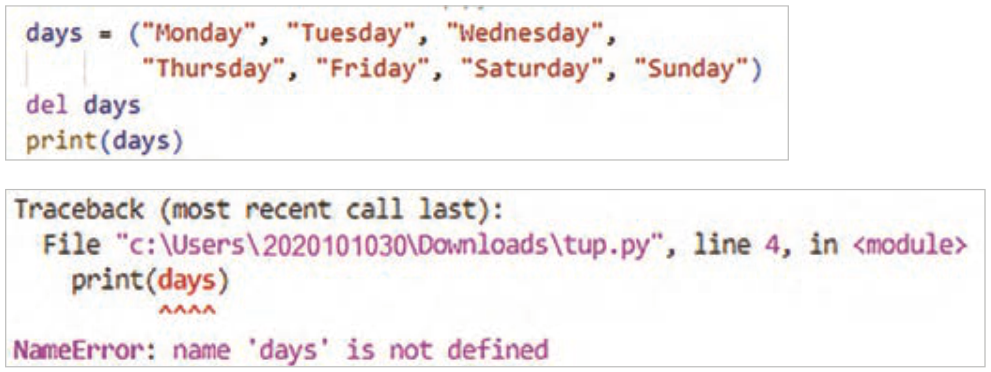
حذف Tuple: در پایتون امکان حذف عناصر یک توپل وجود ندارد. ولی میتوانید کل یک توپل را با استفاده از دستور del حذف کنید.
مثال: در این برنامه با دستور del توپل days حذف شده است. بعد از اجرای آن هم پیغامی مبنی عدم تعریف توپل days نمایش داده میشود (شکل128).
شکل ۱۲۸
Page 60
Example: create a tuple with three members to hold the usernames of the company's senior managers, and then print it (Figure 124).
Figure 124
Example: the program in Figure 125 uses a tuple to hold the names of the days of the week; since the names of the days do not change, this data structure suits these values.
Figure 125
Accessing the elements of a tuple
Like lists, tuple elements have an index, and an element is reached by its index number.
Example: this program first creates a tuple named name_ port to hold the names of a computer's input ports, and then shows its third element. Note that indexes start at zero (Figure 126).
Figure 126
The elements of a tuple are immutable (immutable). That is, if you try to change them after they are set, the program shows an error.
Page 61
Example: in the example in Figure 127 the program tries to change the value of the tuple's second element, but running it causes an error.
Figure 127
Deleting a tuple: in Python you cannot remove the elements of a tuple, but you can delete a whole tuple with the del statement.
Example: in this program the tuple days is deleted with del. After that, a message says that the tuple days is not defined (Figure 128).