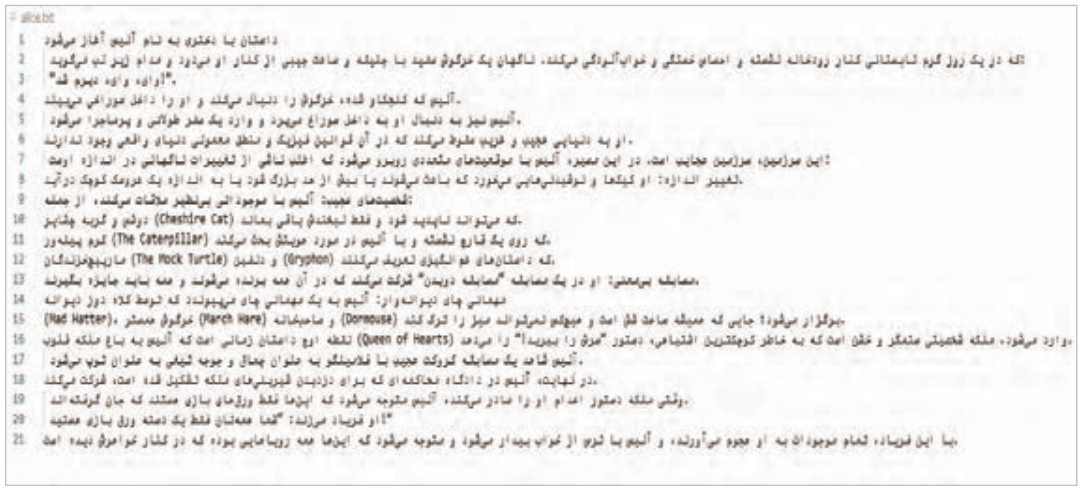
حالا اگر فایل alice.txt را ایجاد کنید و آن را در پوشه مناسب قرار دهید این بار بلوک try اجرا خواهد شد.
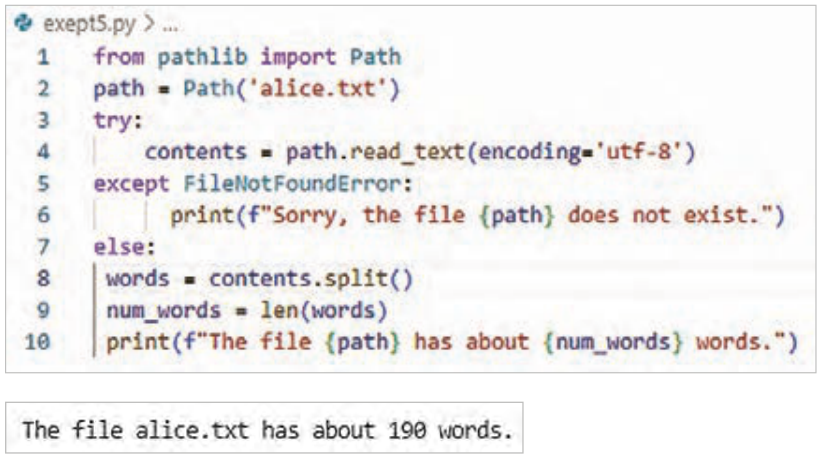
برنامه فایل را پیدا میکند و وارد بلوک else میشود.
متن آلیس در سرزمین عجایب را واردکنید، پایتون متن فایل را بهعنوان یک رشته طولانی درنظر میگیرد.
برای تولید لیستی از تمام کلمات موجود در کتاب، از متد رشتهای استفاده کنیدکه به طور پیشفرض یک رشته را در هر جایی که فضای خالی پیدا کند، تقسیم میکند.
برای شمارش تعداد این کلمات از len() استفاده کنید.
شکل ۴۵
صفحه ۲۶۸
کار با چند فایل
کار با چند فایل یکی از مهارتهای مهم است، چون تقریباً هیچ برنامه واقعی فقط با یک فایل کار نمیکند. کار با چند فایل یعنی برنامه بتواند بدون تکرار کد:
چندین فایل را پشت هم بخواند و روی همه آنها یک عملیات مشابه انجام دهد. پس لازم است یک تابع تعریف کنید و همچنین خطاها هم مدیریت و سپس نتایج ذخیره شوند.
برای انجام این کارکتابهای بیشتری را برای تحلیل اضافه کنید.
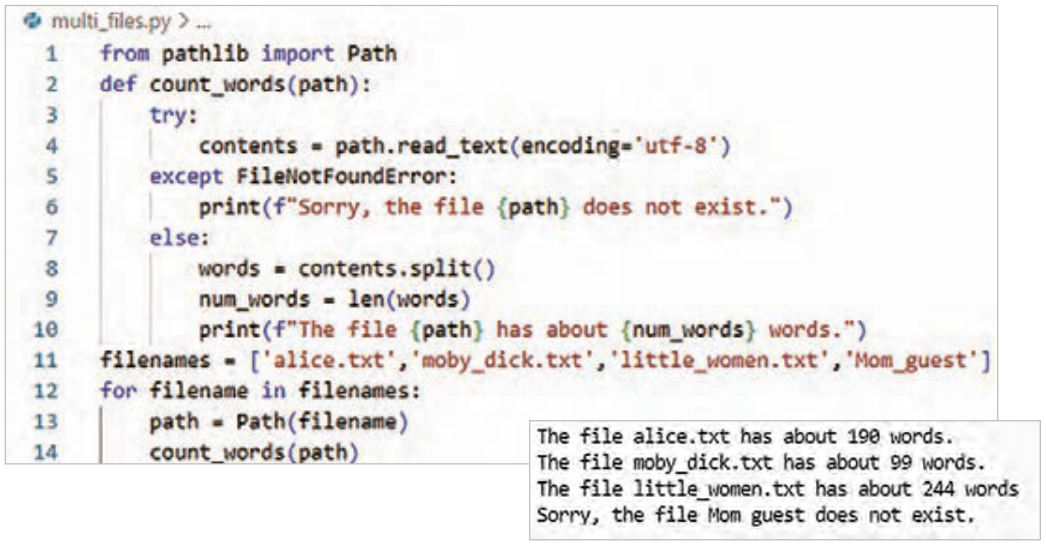
برای اینکه اجرای تحلیل روی چندین کتاب مختلف سادهتر و منظمتر شود بهتر است، بخش اصلی برنامه را به یک تابع به نام count_word منتقل کنید. اگر کدها را با برنامه قبل مقایسه کنید، متوجه میشوید تغییرات شامل اصلاح تو رفتگی و انتقال به بدنه تابع است.
خط 2: تابع def count_words(path) یک ورودی به نام path میگیرد که مسیر یک فایل متنی است.
خط 11: این خط از کد نام فایلها بهصورت رشتههای متنی (String) در یک لیست به نام filenames ذخیره میکند.
خط 12: در این خط ازیک حلقه for برای بررسی تکتک فایلهای داخل لیست و به دست آوردن تعداد کلمات متن فایل استفاده شده است.
خط 13: نام فایل به یک شیء از نوع Path تبدیل میشود.
خط 14: تابع count_words برای آن فایل اجرا میشود.
و اگر فایلی وجود نداشته باشد، برنامه خطا نمیدهد و پیام مناسب نمایش میدهد.
شکل ۴۶
صفحه ۲۶۹
نادیده گرفتن خطا (Failing Silently)
شکل ۴۷
در مثال قبلی، به کاربر اطلاع داده میشد که یکی از فایلها در دسترس نیست. با این وجود، در همه برنامهها نیازی نیست تمام خطاهای رخداده به کاربر نمایش داده شود.
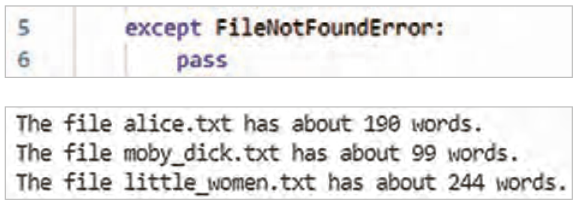
در این حالت، خطا رخ میدهد، اما هیچگونه پیامی به کاربر نمایش داده نمیشود و روند اجرای برنامه بدون وقفه ادامه مییابد. برای پیادهسازی این حالت، از ساختار try-except استفاده میشود. با این تفاوت که در بخش except بهصورت صریح به مفسر پایتون دستور داده میشود هیچ عملی انجام ندهد. پس دستور print بعد از except را حذف کنید تاپیام خطا نمایش داده نشود و به جای آن دستور pass را اضافه کنید.
در زبان برنامهنویسی پایتون، دستور pass برای خالی نگهداشتن یک بلوک کد و انجام ندادن هیچگونه عملی به کار میرود. اگر فایل وجود نداشته باشد، خطا رخ میدهد، اما هیچ پیامی نمایش داده نمیشود، برنامه متوقف نمیشود و اجرای برنامه ادامه پیدا میکند.
شکل ۴۸
ذخیرهسازی دادهها
در بیشتربرنامهها، مثل تنظیمات دلخواه کاربری برای یک بازی یا دادههایی برای نمایش نمودار، اطلاعاتی از کاربران دریافت میشود. صرف نظر از نوع آنها، اطلاعات وارد شده در ساختارهای دادهای مانند لیستها و دیکشنریها ذخیره میشوند. اما وقتی برنامه بسته میشود، این دادهها از بین میروند. برای حفظ اطلاعات برای دفعات بعد اجرای برنامهها میتوانید آنها را در فایل ذخیره کنید. یکی از سادهترین روشها برای اینکار، استفاده از فایلهای JSON است که کمک میکنند دادههای پایتون بهصورت متنی ذخیره و در اجرای بعدی برنامه دوباره خواندهشوند. این قالب مخصوص پایتون نیست و در زبانهای برنامهنویسی دیگر نیز کاربرد دارد. در پایتون برای کار با JSON از ماژول json استفاده میشود.
شکل ۴۹
صفحه ۲۷۰
json.dump() دادهها را به قالب JSON تبدیل میکند و json.loads() دادههای ذخیره شده را دوباره به ساختارهای پایتون برمیگرداند.
فایلهای JSON به دلیل سادگی، خوانایی و کاربردگسترده یکی از روشهای مهم ذخیرهسازی دادهها در برنامهنویسی هستند.
ذخیره یک لیست در فایل JSON
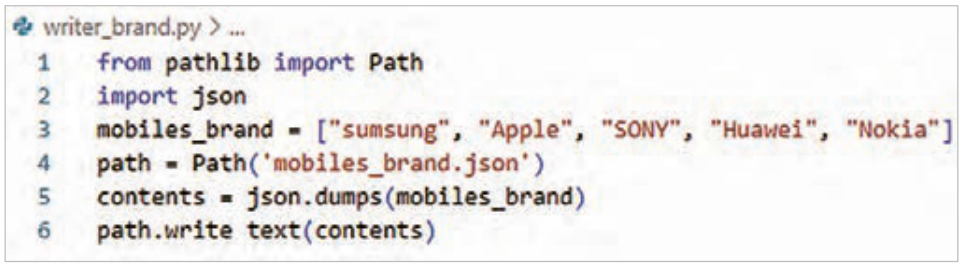
توضیح کد:
خط 2ـ ماژول json وارد برنامه شدهاست.
خط 3ـ لیستی از برندهای تلفن همراه برای ذخیرهسازی ایجاد شده است.
خط 5ـ با استفاده از تابع dump، دادههای مورد نظر به قالب JSON تبدیل شدهاست. خروجی این تابع یک رشته متنی است که نمایانگر دادهها بهصورت json است
شکل ۵۰
خط 6ـ این رشته متنی با استفاده از متد write-text داخل فایل ذخیره میشود.
این برنامه خروجی در صفحه نمایش ندارد، اما اگر فایل mobiles_brand.json را باز کنید خواهید دید که دادهها به شکلی ذخیره شدهاند که بسیار شبیه به ساختار دادهها در پایتون است.
شکل ۵۱
خواندن دادهها از فایل JSON
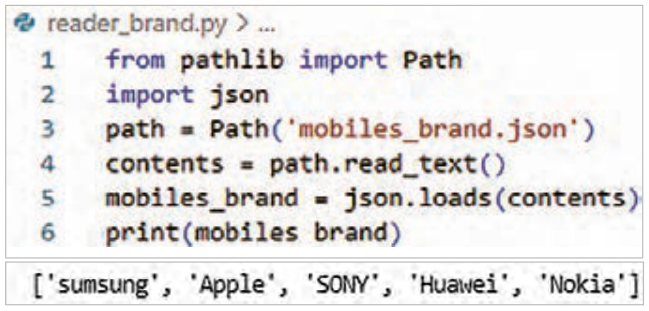
برای برگرداندن اطلاعات ذخیره شده در فایل JSON به حافظه، لازم است برنامهای دیگر نوشت.
شکل ۵۲
صفحه ۲۷۱
توضیح کد:
خط 2ـ ابتدا ماژول json وارد برنامه شده است.
خط3ـ سپس محتوای فایل JSON را خوانده و بهصورت یک رشته متنی ذخیره شده است.
خط 4ـ از آنجا که فایل JSON در اصل یک فایل متنی با قالب مشخص است، با استفاده از متد read_text() خوانده شده است.
خط 5ـ در مرحله بعد با استفاده از تابع loads، این رشته متنی به ساختار دادهای مناسب در پایتون تبدیل شده است. در این برنامه، دادهها دوباره بهصورت یک لیست از اعداد در حافظه ذخیره میشوند.
پس از این مرحله، میتوانید از دادهها مانند سایر لیستهای پایتون استفاده کنید. به این ترتیب اطلاعاتی که قبلاً در فایل JSON ذخیره شده بودند، در اجرای بعدی برنامه دوباره قابل استفاده خواهند بود.
مثال: برنامهای بنویسید که مشخصات فنی یک گوشی هوشمند (شامل برند، مدل، مقدار رم و وضعیت گارانتی) را در قالب یک دیکشنری تعریف کند. سپس این برنامه باید:
با استفاده از کتابخانه json و کلاس Path از کتابخانه pathlib این دیکشنری را در فایلی بهنام mobile_specs.json ذخیره کند.
در مرحله بعد، فایل را باز کرده، محتوا را خوانده و فقط «مدل» و «مقدار رم» گوشی را در خروجی چاپ کند.
صفحه ۲۷۲
Page 267
Now if you create the file alice.txt and put it in the suitable folder, this time the try block will run.
The program finds the file and enters the else block.
Import the text of Alice in Wonderland; Python treats the text of the file as one long string.
To produce a list of all the words in the book, use the string method that by default splits a string wherever it finds white space.
To count the number of these words use len().
Figure 45
Page 268
Working with several files
Working with several files is an important skill, because almost no real program works with only one file. Working with several files means the program can, without repeating code:
read several files one after another and do a similar operation on all of them. So you need to define a function, and also the errors must be managed and then the results saved.
To do this, add more books for analysis.
To make running the analysis on several different books simpler and more orderly, it is better to move the main part of the program to a function named count_word. If you compare the code with the previous program, you notice that the changes consist of fixing the indentation and moving to the body of the function.
Line 2: the function def count_words(path) takes one input named path, which is the path of a text file.
Line 11: this line of code stores the names of the files as strings in a list named filenames.
Line 12: in this line a for loop is used to check each file in the list one by one and get the number of words of the text of the file.
Line 13: the file name is turned into an object of the Path type.
Line 14: the function count_words runs for that file.
And if a file does not exist, the program gives no error and shows a suitable message.
Figure 46
Page 269
Ignoring errors (Failing Silently)
Figure 47
In the previous example, the user was told that one of the files was not available. However, in all programs there is no need to show every error that happened to the user.
In this case the error happens, but no message is shown to the user and the running of the program continues without a pause. To implement this, the try-except structure is used. The difference is that in the except part the Python interpreter is explicitly told to do nothing. So remove the print statement after except so that the error message is not shown, and add the statement pass in its place.
In the Python programming language, the statement pass is used to keep a block of code empty and do nothing. If the file does not exist, the error happens, but no message is shown, the program does not stop and its running continues.
Figure 48
Storing data
In most programs, such as the user's chosen settings for a game or data for showing a chart, information is received from users. Whatever its type, the entered information is stored in data structures such as lists and dictionaries. But when the program is closed, this data is lost. To keep the information for the next runs of the programs, you can save it in a file. One of the simplest ways to do this is to use JSON files, which help Python data be stored as text and read again in the next run of the program. This format is not specific to Python and is used in other programming languages too. In Python the module json is used to work with JSON.
Figure 49
Page 270
json.dump() turns the data into JSON format and json.loads() turns the stored data back into Python structures.
Because of their simplicity, readability and wide use, JSON files are one of the important ways of storing data in programming.
Saving a list in a JSON file
Explanation of the code:
Line 2 - the json module is imported into the program.
Line 3 - a list of mobile phone brands is created for storing.
Line 5 - using the function dump, the wanted data is turned into JSON format. The output of this function is a text string that represents the data as json
Figure 50
Line 6 - this text string is saved inside the file using the method write-text.
This program has no output on the screen, but if you open the file mobiles_brand.json you will see that the data is stored in a form very similar to the structure of data in Python.
Figure 51
Reading data from a JSON file
To bring the information stored in the JSON file back into memory, another program must be written.
Figure 52
Page 271
Explanation of the code:
Line 2 - first the json module is imported into the program.
Line 3 - then the content of the JSON file is read and stored as a text string.
Line 4 - since a JSON file is in essence a text file with a specific format, it is read using the method read_text().
Line 5 - in the next step, using the function loads, this text string is turned into a suitable data structure in Python. In this program, the data is stored again in memory as a list of numbers.
After this step, you can use the data like other Python lists. In this way, the information that was stored earlier in the JSON file can be used again in the next run of the program.
Example: write a program that defines the technical specifications of a smartphone (including the brand, model, amount of RAM and warranty status) in the form of a dictionary. Then this program must:
Using the json library and the class Path from the pathlib library, save this dictionary in a file named mobile_specs.json.
In the next step, open the file, read the content and print only the "model" and the "amount of RAM" of the phone in the output.